
Operations & Management Strategy: Keeping AI Facilities Reliable, Safe, and Efficient
Uptime Institute’s AI Infrastructure Advisory – Part 5 of 5
Design, vendor selection, construction, and commissioning are finite projects. Operations are not. According to Uptime Institute, the long‑term value of an AI data center depends entirely on how well it is operated and maintained. Yet operations are often treated as an afterthought – a mistake that can lead to preventable outages, safety incidents, and stranded capacity.
AI facilities are not conventional data centers with a few GPU racks. They operate at extreme densities, use unfamiliar technologies (direct liquid cooling, medium‑voltage power), and have failure modes measured in seconds. This post, based on Uptime Institute’s Paper 5, covers the critical elements of an operations and management strategy for AI infrastructure.
The Human Factor: Why Experienced Staff Are Non‑Negotiable
AI data centres will be highly automated – predictive controls, real‑time monitoring, and automated failover are essential. But automation cannot replace skilled human judgment, especially during abnormal conditions.
Uptime’s warning:
A GPU can burn out in 30 seconds if coolant flow stops. Air‑cooled servers, by contrast, can run safely for several minutes without airflow. This compressed response time means operators must act instantly and correctly – no time for consulting manuals or escalating up a chain.
Staffing implications:
Experienced leadership is critical, especially for organisations building their first AI facility.
Shift staffing must account for 24/7 coverage with enough trained personnel to handle concurrent failures.
Retention is a major challenge in a competitive market. Uptime recommends formal career paths, ongoing training, and competitive compensation.
Building a Team from Scratch vs. Leveraging Existing Staff
Greenfield AI facility: You will need to recruit, train, and retain a complete operations team. Uptime advises hiring experienced data centre professionals and then upskilling them on DLC, medium‑voltage safety, and AI‑specific procedures.
Existing multi‑site operator: You may transfer staff from other locations. However, do not simply copy operational manuals – update them to reflect AI‑specific demands. Retrain thoroughly; what worked for air‑cooled 15 kW racks will not work for 130 kW DLC racks.
Demarcation: Who Owns the Coolant Loop?
Liquid cooling blurs the traditional boundary between facilities and IT teams. In an air‑cooled data center, the facility team owns the chilled water loop; IT owns nothing beyond the server inlet. In a DLC facility, coolant circulates inside the IT rack, across cold plates mounted on GPUs.
Uptime’s recommended demarcation points:
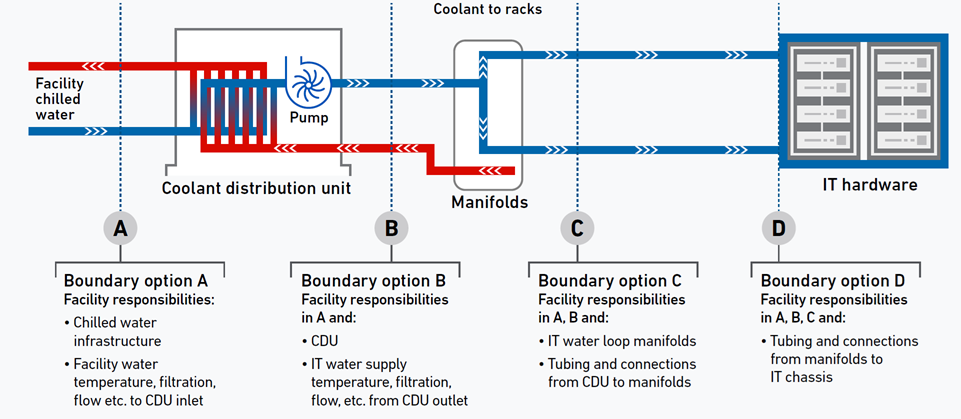
The boundary (or demarcation) options between facilities and IT teams set at four points (A to D). Source: Uptime
| Demarcation Point | Facility Team Responsibility | IT Team Responsibility |
|---|---|---|
| A – Primary coolant loop | Chillers, pumps, primary piping, thermal storage | Nothing |
| B – Coolant Distribution Unit (CDU) | CDUs, secondary loop up to rack manifold inlet | Manifold outlet to cold plates (or vice versa) |
| C – Rack manifold | Manifold including quick‑tee connectors | Cold plates and internal server connections |
| D – Inside server | Nothing | Cold plates, hoses, leak detection inside server |
Why this matters:
If coolant becomes contaminated, who pays for flushing the system? Who replaces clogged cold plates? Who responds to a drip inside a rack? These must be contractually and operationally defined before the facility goes live.
Uptime’s advice:
Most operators choose demarcation at point B or C. Keeping facility responsibility up to the CDU outlet is common, but then IT must manage rack manifolds – which requires IT staff trained in liquid handling. Alternatively, facility extends responsibility to the quick‑tee connectors, but that increases facility team workload and requires coordination during server swaps.
Safety: Higher Power Densities, Higher Risks
AI facilities operate at power levels that can be lethal. Uptime highlights two specific safety concerns.
1. High Currents at Conventional Voltages
Many AI facilities still use 3 phase, 415V distribution but at much higher currents (e.g., 800A vs. 32A). Electricians trained in conventional data centres may not appreciate that higher current increases arc flash energy even at the same voltage.
Operational safeguards:
Reinforced lockout/tagout (LOTO) procedures
Mandatory personal protective equipment (PPE) – arc flash suits, face shields, insulated gloves
No work on energized circuits – de‑energise before touching
2. Medium‑Voltage (800 VDC and Above)
Future AI facilities will adopt medium‑voltage distribution to reduce cable costs. This is a different regime: different clearances, different training, different tools.
Preparation:
Train all electrical staff on medium‑voltage safety (separate certification)
Update emergency response procedures – medium‑voltage arcs behave differently
Ensure switching and isolation gear is clearly labelled and accessible
3. Liquid Cooling Safety
Coolants (water/glycol, dielectric fluids) introduce their own hazards:
Glycol is toxic if ingested; spills require containment and specialised cleanup.
Dielectric fluids (for immersion cooling) may be flammable or require specific fire suppression.
Hot surfaces – coolant pipes can reach high temperatures; burns are possible.
Operational must‑haves:
Material safety data sheets (MSDS) for all fluids on site
Spill kits and trained response teams
Regular fluid sampling and testing (conductivity, pH, contamination)
Hardware Lifecycles: Shorter, Faster, Less Predictable
AI hardware evolves rapidly. Uptime notes that GPUs have a usable life of about three years - compared to up to ten years for CPUs. This changes maintenance and capacity planning.
Refresh Cycles
Planned refreshes: Every 2–3 years, you will likely replace entire GPU clusters. The facility must support hot‑swap of racks, manifolds, and even CDUs without prolonged downtime.
Unplanned changes: New GPU generations may have different cooling requirements (higher flow rates, different cold plate interfaces) or power demands (higher voltage, different connectors).
Failure Rates Are Higher
GPUs have a higher non‑fatal failure rate than CPUs. Meta has reported that a 16,384‑GPU cluster experiences a failure every three hours. These are often not complete outages – a single GPU fails, the training job pauses, and the system resets.
Operational response:
Automate detection and restart of failed GPU jobs (checkpointing every few minutes).
Train staff to replace GPUs quickly – meaning tool‑less access, clear procedures, and spare GPU stock.
Monitor GPU temperature and power at a granular level (per chip) to predict failures before they happen.
Evolving Workloads
AI training is still a research field. Large language models (LLMs) and other workloads may change dramatically in power profile, cooling demand, and network topology. Operators should expect less predictability than in conventional enterprise data centers.
Uptime’s recommendation:
Build in flexibility. Use modular power distribution (e.g., busways that can be reconfigured). Design cooling loops with spare capacity and multiple connection points. Avoid proprietary interfaces that lock you into a single vendor or generation.
Operational Documentation: SOPs, MOPs, EOPs
Uptime’s Paper 5 provides a detailed framework for operational documentation. AI facilities need more rigorous and more frequently updated documents than conventional sites.
Required Document Types
SOP (Standard Operating Procedure) – For routine tasks such as starting a CDU or swapping a GPU. Includes step‑by‑step instructions with photos of DLC connectors, lockout points, and fluid handling.
MOP (Method of Procedure) – For maintenance activities like cleaning a strainer or replacing a pump. Includes isolation sequences that maintain continuous cooling and coordination between facility and IT teams.
EOP (Emergency Operating Procedure) – For failure responses such as coolant leaks or power outages. Defines sub‑second response expectations, escalation paths, and when to shut down IT.
Runbook – A collection of SOPs, MOPs, and EOPs organised by scenario. Indexed by failure mode and updated after each incident.
Training and Qualification
Documents are useless if staff are not trained on them. Uptime recommends:
Formal qualification policy – Staff must pass written and practical exams on each procedure.
Recurrent training – Annual refreshers plus after any major change (new GPU generation, new coolant type).
Simulation – Use load banks and failure simulation during commissioning (Level 5) to practice EOPs without risk to production IT.
External training resources:
Vendor factory training (CDU manufacturers, UPS suppliers) and industry courses (e.g., Uptime’s AOS – Accredited Operations Specialist) can fill gaps.
Maintenance Management: Reliability‑Centered
Preventive and predictive maintenance must be rethought for AI infrastructure.
Continuous Cooling Means Continuous Maintenance
Because cooling cannot be interrupted without risking GPU damage, maintenance on CDUs, pumps, chillers, and UPS systems must be performed without taking the system offline. This requires:
Redundant components (N+1 or 2N) so one unit can be isolated.
Maintenance bypasses – valves, breakers, and switches that allow safe isolation.
Procedures that do not rely on human speed – automated transfer to backup before maintenance begins.
Predictive Maintenance for DLC
Monitor for early signs of trouble:
Pressure drop across filters or cold plates – indicates clogging.
Flow rate deviation – pump wear or partial blockage.
Temperature rise at specific rack positions – potential cold plate failure.
Leak detection – even small drips should trigger inspection.
Spare parts strategy:
Lead times for DLC components (CDUs, cold plates, manifolds) can be long. Stock critical spares on site: at least one spare CDU pump, a set of cold plates, and a roll of quick‑tee connectors.
Capacity Management
Track power, cooling, and space utilisation at a granular level. AI facilities may add or remove GPU racks frequently. Uptime recommends:
Real‑time monitoring of each rack’s power draw and coolant flow.
Capacity dashboards that show remaining headroom per CDU, per chiller, per UPS.
Lifecycle planning records – when each major component is due for replacement. Addition reading on lifecycle intelligence.
Putting It All Together: An Operations Strategy That Works
Based on Uptime Institute’s Paper 5, an effective operations and management strategy for AI facilities must include:
Adequate, trained staff – with clear roles, KPIs, and retention plans. Experienced leadership is essential.
Clear demarcation – between facility and IT teams for liquid cooling, power distribution, and incident response.
Safety programmes – updated for high currents, medium‑voltage, and coolant hazards. Reinforced LOTO and PPE.
Hardware lifecycle management – three‑year GPU refreshes, high failure rate tolerance, flexible infrastructure.
Operational documentation – SOPs, MOPs, EOPs, and runbooks, with formal qualification and recurrent training.
Reliability‑centered maintenance – continuous cooling permits maintenance via redundancy; predictive monitoring for DLC; spares on hand.
Capacity and lifecycle tracking – real‑time dashboards and replacement schedules.DLC systems circulate water/glycol mixtures. Even a small leak can damage IT equipment. Construction must include:
Double‑containment piping or drip trays under all coolant lines
Leak detection cables at every joint and manifold
Sloped floors or drainage channels in case of large leaks
Physical separation between liquid piping and electrical cables
Conclusion: The Five‑Part Series – From Design to Operations
This concludes our five‑part series based on Uptime Institute’s AI Infrastructure Advisory white papers:
Design Development & Review – High density, DLC, continuous cooling, and physical space.
Technical Vendor Requirements & Evaluation – DLC vs. immersion, power volatility, structured RFPs.
Construction Oversight & Validation – Preventing design‑to‑build drift, phased construction, structural demands.
Level 4 & 5 Commissioning – AI‑aware load banks, DLC testing, integrated system validation.
Operations & Management Strategy – Staffing, safety, demarcation, hardware lifecycles, maintenance.
AI infrastructure is not simply a scaled‑up version of conventional data centres. It demands new thinking at every stage - from the first design sketch to the daily operations checklist. Organisations that follow this framework will deploy faster, operate more reliably, and avoid the costly pitfalls that have derailed many early AI projects.